
Attribution Setup
Configure Effectiveness-Based Attribution and review how credit is assigned.
Updated 9 August 2026Decide how journey touchpoints earn credit
Attribution Setup controls how Incendium distributes conversion value across the journey. It contains two separate models: Incendium's Effectiveness-Based Attribution (EBA) and a Custom Attribution Model.
Configure accurate Locations, Conversions and Effectiveness Rules first. Attribution can only allocate the evidence that exists, and stronger inputs produce a more defensible view of which marketing and website experiences contributed to the outcome.
Effectiveness-Based Attribution
EBA combines the weight assigned to each part of the journey with the effective pageviews observed at that point. It is designed to reward touchpoints that did more than merely appear in the path.
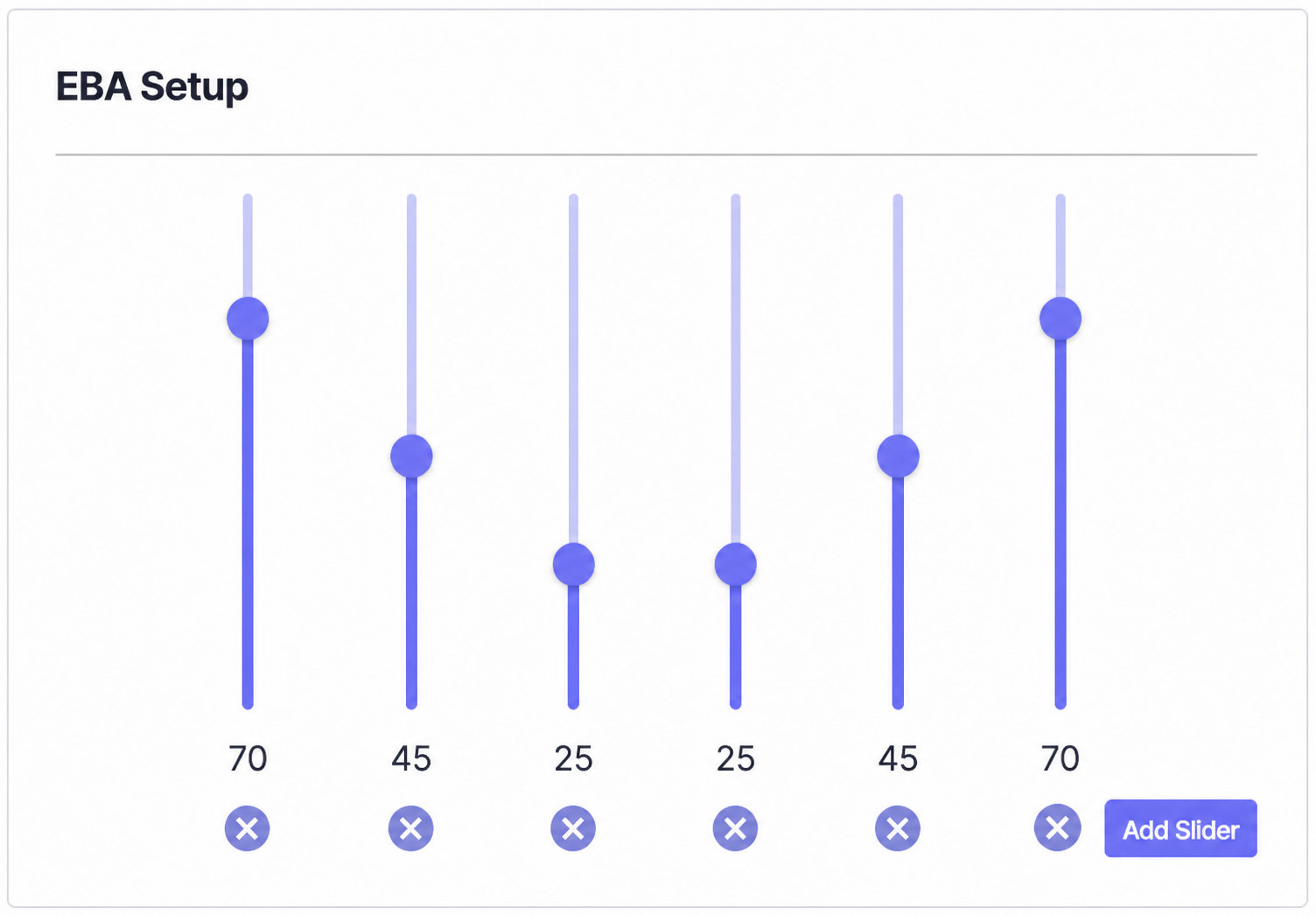
Choose the journey resolution
Each slider represents an equal portion of the path from the first touchpoint to sale. Four sliders create four 25% sections; ten sliders create ten 10% sections.
Set the weights
Move a slider between 0 and 100 to increase or reduce the influence of that section. The values express relative emphasis; they do not need to add up to 100.
Add or remove sections
Add Slider increases the number of equal journey sections. The circular remove control deletes a section. Use enough sections to express the strategy without creating false precision.
Save the EBA setup
Choose the Save Setup button within the EBA panel. Changes are processed rather than applied instantly and can take 30 minutes or more to appear in analytics.
Shape the weighting deliberately
Increase earlier sections when discovery and demand creation are strategically important.
Increase later sections when closing interactions and high-intent sessions deserve more credit.
Use a balanced curve, or emphasise both first and final sections, when introduction and closure are both important.
Do not tune the curve simply to make a preferred Channel look stronger. Start with a business hypothesis, save one controlled change, then review the result after processing.
Custom Attribution Model
The Custom Attribution Model uses the same slider structure but applies the selected weights to sessions along the journey without EBA's effective-pageview layer. It is useful when the organisation has a defined attribution philosophy it wants to model directly.
The Custom panel has its own Save Setup button. Saving EBA does not save Custom Attribution, and vice versa. Custom-model changes can also take 30 minutes or more to appear.
EBA asks which touchpoints combined strategic journey position with effective engagement. Custom Attribution applies the weighting pattern the business defines. Keep the distinction clear when presenting either model.
Use Attribution Comparison
The comparison shows the distribution of Conversions across the top ten sources for the last 30 days. Toggle the attribution model to compare how the currently processed models assign performance.
The comparison reflects current model performance; unsaved or still-processing slider changes do not immediately alter it. Allow processing to complete before drawing conclusions, and compare meaningful periods rather than reacting to one short-term movement.
Change attribution without losing the explanation
- Confirm Conversion and Interaction definitions before changing weights.
- Validate Pageview and Session Effectiveness Rules used by EBA.
- Change one model or weighting hypothesis at a time.
- Record the previous slider count and values before a material change.
- Wait for processing before comparing reports.
- Explain the model alongside attributed revenue or conversions; the number is only useful when people understand how credit was assigned.