
Install the Incendium tracking code
Add, configure and verify the Incendium tracking script on your website.
Updated 9 August 2026Why the tracking code matters
The Incendium script records the visit and interaction data that connects website behaviour with campaigns, conversions and revenue. The more complete that foundation is, the more reliable the decisions made from it—whether a person is comparing channels or an advertising platform is using conversion signals to optimise targeting.
Use the direct script when the website is not already covered by a Shopify, WooCommerce or other supported integration. Avoid installing both methods unless Incendium support has confirmed that the implementation requires it.
Missing visits change conversion rates, attribution and audience composition. They can also weaken the feedback sent to platforms such as Meta. Treat installation and verification as a measurement task, not simply a tag-management task.
Install the script
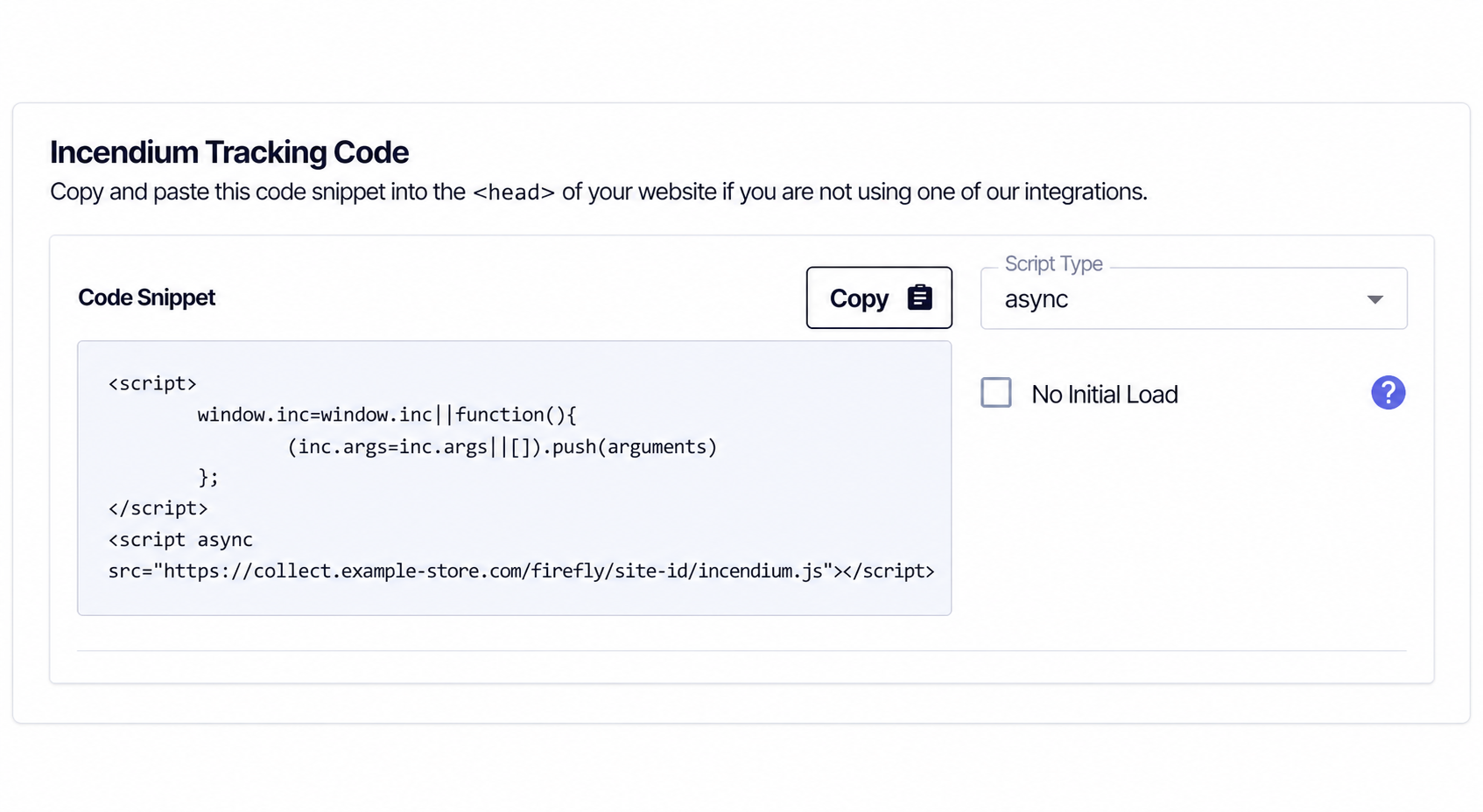
Open the integration
In Incendium, go to Settings → Connections → Integrations and find Incendium Tracking Code.
Choose the loading behaviour
Use the default asynchronous option unless your implementation has a specific dependency. Enable No Initial Load only when your own code will control the first pageview.
Copy the whole snippet
Copy the generated code without changing its project identifier or script order.
Add it to every measured page
Place the snippet in the site’s <head>, ideally through the shared layout or tag manager so it is not omitted from individual templates.
Publish and test
Open several real page types, then confirm recent activity in Incendium. Include navigation, a conversion path and—where relevant—consent states.
Use a customer-domain script URL
Where appropriate, Incendium can serve the tracking file from a subdomain such as collect.example-store.com. Because the request sits under the organisation’s own domain, it is less exposed to generic third-party blocker lists and fits a first-party data architecture more naturally.
Create and validate the subdomain first, then use the customer-domain script URL supplied for the project. This improves resilience; it does not bypass a visitor’s consent choice and should not be presented as a guarantee against every browser or network restriction.
Verification checklist
- The script loads once on every intended page template.
- There are no duplicate manual and app-based installations.
- Recent visits appear in the correct project and date range.
- Locations identify the test pages as expected.
- Conversions or ecommerce events appear after a controlled test.
- Consent behaviour matches the organisation’s policy and implementation.