
Personalization Campaigns
Configure the audience, conditions and experience for a campaign.
Updated 9 August 2026Deliver a relevant experience to an eligible population
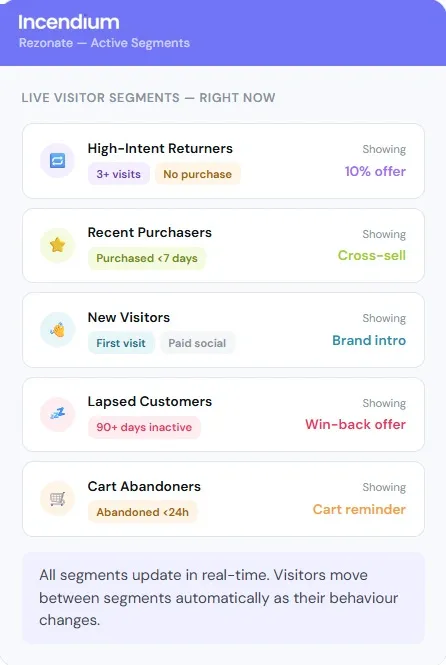
Open Optimize → Personalization → Campaigns and choose New Campaign. Personalization uses the same reusable Component library and placement controls as A/B Testing, but its objective is to serve an appropriate experience to qualifying people rather than establish one general winner.
Set schedule and evaluation behaviour
Complete the Name, Description and optional start and end dates. By default, Campaign eligibility is cached to make subsequent delivery faster. Enable No Cache only when membership changes so frequently that Incendium must evaluate the visitor again on every Pageview; this can delay delivery.
Define who should receive it
Controls the likelihood that a new eligible lead joins the Campaign. Use less than 100% only when deliberate holdback or capacity management is required.
Stops new inclusion after a defined capacity. Leave blank for no Campaign limit.
Use calculated behavioural groups. A membership change may not apply until a subsequent Pageview.
Use immediately supplied classifications from JavaScript or URL parameters. They are suitable for current-visit targeting.
Leaving both targeting fields blank makes the experience available to everyone subject to the Campaign probability and schedule.
Configure the experience
Under Personalization, choose Add New Personalisation. Select the Component, Location, CSS Selector and Insertion Method. Add further items only when they form one coherent experience; unrelated changes are harder to validate and maintain.
Preview every Location template that can qualify. The same CSS Selector must identify the intended target throughout that scope.
Activate and maintain it
The Campaign list shows its dates, probability, lead limit, active state and included personalizations. Use the active control deliberately and open View in Analytics after launch. When a Trait, Audience or page template changes, review the Campaign rather than assuming its old targeting and placement remain valid.