
Audiences
Create and maintain reusable groups from Incendium data.
Updated 9 August 2026Turn first-party behaviour into reusable groups
Audiences combine Incendium's first-party visit, page, traffic, lead and sales data into named groups. The same definition can then support analysis and Personalization, so teams are not comparing one segment in a report while targeting a subtly different segment on the site.
Open Settings → Audiences → Audiences and add an Audience. Start with the business question and the action the team will take; a smaller set of purposeful groups is more valuable than a long list of overlapping segments.
Build and test the rules
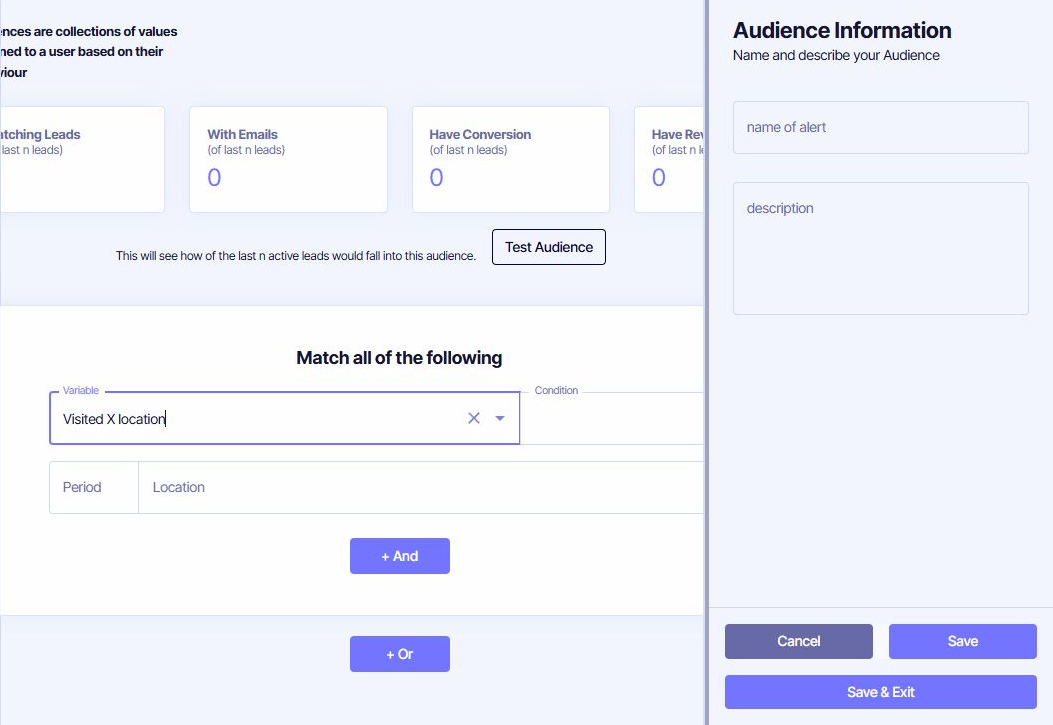
Choose whether the lead must match all conditions, then add and or or branches deliberately. The Variable menu includes:
Select an existing Trait when the business or website already supplies a classification.
Use URL, path, Location, landing Location, pageview volume, time, scroll speed or effective-pageview behaviour.
Use visit frequency, recency, conversions and the Channel, source, medium, Campaign, search term or Bucket that brought the lead.
Use browser, device, score, status, revenue, purchases, recency and percentile-based value measures.
Some variables reveal additional controls after selection. For example, Visited X Location asks for the Condition, Period and Location. Read the complete sentence formed by the controls before saving.
Use Test Audience before saving
Test Audience checks the rule against a recent active-lead sample and reports Matching Leads, leads With Emails, those with a Conversion and those with a Revenue Conversion. Use these counts to catch an unexpectedly broad, empty or commercially weak rule.
The test is a current sample, not a forecast. Seasonality, date coverage and incomplete historical data can change the result. Choose Save to keep working or Save & Exit when the definition and description are ready for other users.
Unlike an immediately supplied Trait, a behavioural Audience can update after Incendium processes qualifying activity, sometimes on a subsequent pageview. Allow for that timing when testing a newly created Audience or using it for live Personalization.
Keep definitions trustworthy
- Describe who belongs, why the group exists and its intended use.
- Use Locations and trained Channels rather than fragile raw URL or source variants where possible.
- Avoid contradictory AND conditions or overly permissive OR branches.
- Retest after changing a dependent Trait, Location, Conversion or traffic rule.
- Review membership size before drawing conclusions from a small group.