
User Dashboard
Investigate the activity and value associated with an individual user.
Updated 9 August 2026Investigate the journey behind an aggregate
The User Dashboard helps answer why a particular lead appears in an Audience, received a score or completed an outcome. Use it to investigate an individual journey after a report exposes an interesting pattern; it should not replace aggregate reporting for judging overall performance.
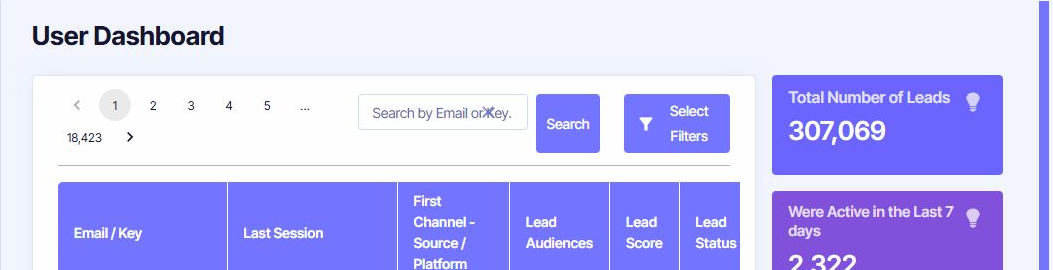
Find the right lead
Open Analyze → Standard Reports → User Dashboard. Search by Email or Key when you have a known identifier, or choose Select Filters to build a Lead Timeline filter from a Dimension, Operator and Value.
The list provides Last Session, first Channel and source/platform, Lead Audiences, Lead Score and Lead Status. Confirm the project and date context before assuming that two identifiers represent the same person.
Read the individual dashboard
Open a row to see the lead's User Details and first-touch information, together with Total Revenue, Status, Score and Audience membership. The timeline then connects visits with Channel, source, Campaign, pageviews, duration, Interactions and whether activity was effective.
Expand a visit to inspect the page Location and path, time on page, percentage viewed and scrolling. The dashboard also summarises the lead's most common source, top product impression and most visited Locations. These details can explain a journey, but one unusual visitor is not evidence of a general trend.
Use individual data responsibly
- Access a lead only for a legitimate support, analysis or operational purpose.
- Share screenshots only after removing email addresses, keys and other identifiers.
- Use Audience Comparison or aggregate reports before making broad marketing decisions.
- Remember that consent, browser restrictions and identity changes can make a timeline incomplete.